


 Bonus
Bonus 
Ownersbox evaluation


Ownersbox informations

After completing our registration on the site, I wanted to see if the mobile experience matched the “fast, no-fuss” pitch. Our investigations allow you to make an informed call before you install anything, especially if you’re juggling state eligibility, game modes, and login hiccups.
The OwnersBox App is OwnersBox’s mobile home for fantasy contests and quick-pick formats, with free-to-play and real-money options depending on where you’re located. In my testing, the navigation is generally clean and built for quick actions, not the classic “desktop site squeezed into a phone” mess you sometimes get in this category. Our research also shows that availability and features can vary by jurisdiction, so the smartest move is to treat eligibility as step one, not an afterthought.

If you want the current promo context before you install, jump to our OwnersBox promo code page. If your main question is “can I use this where I live,” start with OwnersBox legal for the most important eligibility notes. If you want the bigger picture beyond mobile, our OwnersBox review breaks down the platform experience in full.
| Option | Best for | Link type |
| iOS (App Store) | iPhone users who want the simplest install path | Store listing: https://apps.apple.com/us/app/ownersbox-fantasy-sports/id1513599602 |
| Android (Google Play) | Most Android users in eligible regions | Store listing: https://play.google.com/store/apps/details?id=com.ownersbox.android |
| Web (mobile browser) | If you prefer not to install, or you’re troubleshooting | Web access: https://app.ownersbox.com/wfs/mobileapp |
Best for: quick DFS entries, “pick” style contests, and managing lineups on the move.
Supported regions: U.S. availability can vary by state, and other regions may be supported.
Real-money note: real-money play requires eligibility (age and location rules apply).
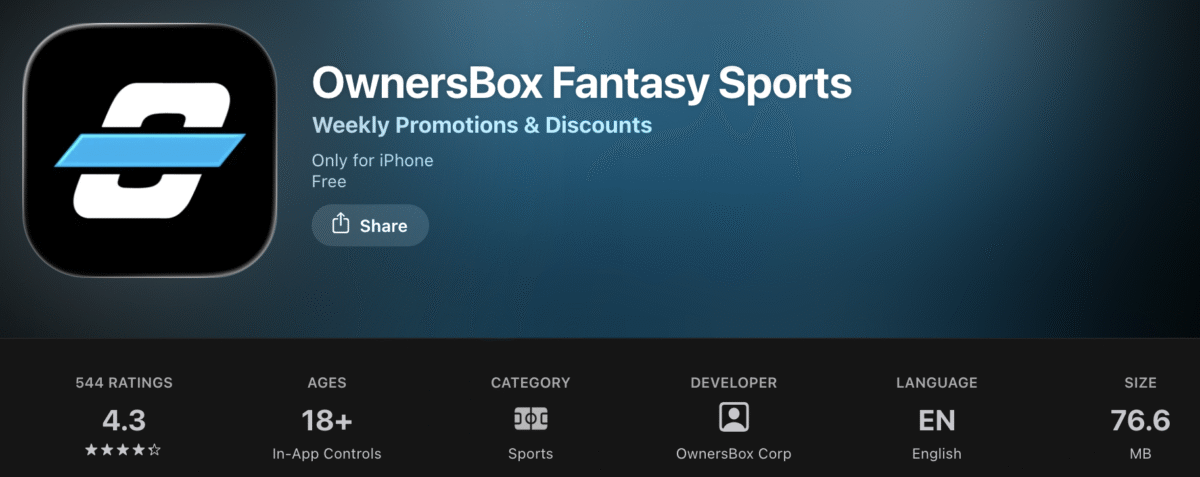
If you’re on iPhone, the cleanest Ownersbox app download route is straight through the Apple App Store. In my testing, the Ownersbox mobile app install is quick, and the first launch is built around one simple decision: create an account or go straight to Ownersbox app login.
What you’ll see on first launch is usually a straightforward create-account or Ownersbox app login screen, not a maze of pop-ups. That’s a good sign, and it matches what we look for in an Ownersbox app review: quick access to the lobby, clear navigation, and no weird friction just to browse.
One quick reality check: people sometimes search “Ownersbox sportsbook app” or “Ownersbox betting app,” but OwnersBox is primarily positioned around fantasy-style formats and pick-based game modes on mobile. That distinction matters, because expectations are where disappointment is born, and I’d rather you skip that whole emotional journey.
On Android, the easiest Ownersbox app download is through Google Play. In my testing, it’s usually smooth. When it isn’t, it’s almost always down to eligibility/region limits, an outdated phone, or a device that’s allergic to updates.
Updates matter more than people think. It’s not just bug fixes. Staying current helps with performance, stability, and the boring compliance stuff that keeps location-based features working properly. If you’re troubleshooting, I always check the “Updated on” info in the Play Store before I do anything dramatic like reinstalling.
| Check | What to look for | Quick fix |
| Android version | A reasonably recent Android OS | Update Android if you’re behind |
| Storage | Enough space for install + updates | Clear space and retry |
| Permissions | Notification/location prompts may pop up | Allow only what you’re comfortable with |
| Updates | The latest version installed | Update in Play Store, then relaunch |
Can’t find it in the Play Store? That’s usually a location/availability thing. Skip ahead to the APK section later in this guide, because that’s where I cover what APKs are, when they’re relevant, and how to avoid sketchy third-party downloads.
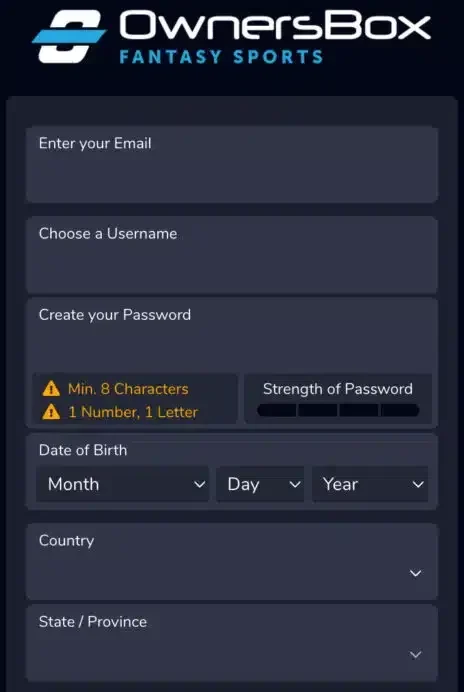
The Ownersbox app login flow is simple. Open the app, tap login, enter your details, and you’re back in the lobby. The annoying part is when something small breaks and it feels bigger than it is. This is the “save yourself 20 minutes of rage-tapping” section.
| Problem | Likely cause | Fix |
| Login loop | Cached session glitch | Force close → reopen → try again |
| Password keeps failing | Wrong password | Reset it and try again |
| Verification code not arriving | Email/SMS delay | Wait a couple minutes → resend → check spam |
| “Not available” or location error | Eligibility/geo restriction | Confirm eligibility in-app and on our OwnersBox legal page |
| App won’t load to login | Crash or outdated build | Update → restart phone → reinstall as last resort |
If you keep seeing eligibility-style errors, don’t brute force it. That’s rarely a “login issue” and usually a jurisdiction rule, which is exactly why our OwnersBox legal guide exists.
This is the part of the Ownersbox app review that actually matters, because OwnersBox isn’t one single format. It’s a few different ways to play, depending on how much time you have and how deep you want to go. Sports fans who are also learning how to bet on world cup matches will find that understanding different game formats and player-based contests can help build confidence before exploring tournament futures, match betting, and other football wagering options.
| Mode | Time to play | Skill vs luck | Typical user | Key mechanic |
| Player Picks | 2–5 mins | Mixed | “Quick sweat” people | Pick outcomes in a simple format |
| Salary Cap | 10–20 mins | More skill | Traditional DFS players | Build a lineup under a cap |
| Lightning Lineups | 2–6 mins | Luck + instinct | Casual, fast entries | Quick lineup selection style play |
| Spin & Draft | 5–12 mins | Luck + draft skill | Draft fans | Faster draft format with a spin element |
I’ve tested a lot of fantasy apps that promise “simple” and then drop you into a cockpit of tabs, sliders, and regret. The Ownersbox mobile app is generally cleaner than that. My Ownersbox app review takeaway: it’s built for quick entries and fast checking, with enough variety to keep regular DFS players from getting bored.
 Pros
Pros
 Cons
Cons
If you want the promo context before you deposit, see the OwnersBox promo code. For the bigger platform breakdown beyond mobile, go to the OwnersBox review.
Yes, it’s legit as an app. The bigger question is availability. In the U.S., what you can access depends on where you are, your age, and the contest type. The fastest “truth” is inside the app itself because that’s what actually blocks or allows entry in real time.
Keep it simple: confirm eligibility in-app, then sanity-check it against OwnersBox legal so you’re not guessing.
| Check | What “good” looks like | If you hit a wall |
| In an eligible location? | Contests appear and allow entry | Review OwnersBox legal, then re-check in app |
| Age requirement met? | You can access paid entries | Confirm the requirement in the app terms |
| Identity verification needed? | Some actions require ID before cashout | Do it early to avoid delays |
If your team can maintain it later, this is a great spot for a state selector module. If you can’t maintain it, don’t publish a hard state list. It goes stale fast.
Availability can change based on your location, so don’t rely on app store access alone—always confirm ownersbox legal states rules before you verify your account, deposit funds, or try to withdraw winnings.
An APK is the Android install file. People usually look for it after they can’t find the app in Google Play. That tends to be a region or eligibility issue, not your phone being “broken.”
My rule: use official sources only. Third-party APK sites are the shortcut to malware, tampered files, or outdated versions.
| Source | Updates | Safety checks | Best for | Notes |
| Google Play | Automatic | Store review + scanning | Most users | Easiest install path |
| Official APK | Manual | You verify the source | When Play Store isn’t available | Install, then keep it updated yourself |
| Third-party APK sites | Unclear | Risky | Nobody | Not worth it |
Most issues are solved in under five minutes, and the fixes are boring. That’s good news.
| Issue | Symptoms | Fast fix | Deeper fix | When to contact support |
| Install/update fails | Won’t install/update | Restart + free storage | Update OS, reinstall | Still fails after reinstall |
| Crash on launch | App closes instantly | Force close, relaunch | Clear cache, reinstall | Repeated crashes |
| Location/geo errors | “Not available” | Toggle Wi-Fi/cellular | Confirm eligibility in OwnersBox legal | You believe you’re eligible |
| Login loop | Keeps bouncing | Force close, retry | Reset password, reinstall | Account access blocked |
| Promo missing | Offer not showing | Log out/in | Confirm terms + eligibility | It should apply but doesn’t |
| Verification stuck | Pending too long | Recheck details | Re-submit clear photos | No movement for an extended period |
| Withdrawal pending | Takes longer | Confirm ID done | Check method details | Past stated timelines |
Updates are the difference between “smooth” and “why does this crash every time I tap that.” Most changes fall into three buckets: performance, navigation tweaks, and bug fixes. Nothing flashy, but it keeps the Ownersbox mobile app stable.
APK installs usually don’t auto-update. You update by installing the newest official APK version
I’m keeping this practical and app-focused. Your main jobs are: find the cashier, keep your details consistent, and do verification early. Most delays come from small admin stuff, not a broken app.
| Action | Stages | Your checklist |
| Deposit | Choose method → confirm | Use accurate, matching details |
| Withdraw | Request → review → processed | Verify ID early, keep info consistent |
| Track status | History/status screen | Screenshot timestamps if it stalls |
Before you make your first deposit, it’s worth checking the latest Ownersbox promo code offers so you know what welcome bonus (or entry credits) you can actually unlock—and whether there are any wagering or withdrawal conditions tied to it.
When something breaks, the fastest way to get help is sending support the right info upfront. OwnersBox support is typically handled through their Help Center options like live chat and support tickets.
| Channel | Best for | Expected response |
| Live chat | Quick fixes (login, app access, basic account questions) | Often fastest when agents are available |
| Support ticket (Submit a Request) | Anything you want logged, attachment-heavy issues, verification/payment follow-ups | Slower than chat, but better paper trail |
| When chat is unavailable or you need to send files | Response times vary |
Device:
OS version:
App version:
Issue (one sentence):
What I expected:
What happened instead:
Steps tried (update/restart/reinstall):
Date/time (include timezone):
Screenshots/screen recording:
If you include the exact error text, you usually skip the “can you clarify?” loop and get straight to a fix.
If your real goal is “I want a different style of play,” here’s the quick, no-hype comparison. I’m keeping it about game style, not marketing.
| App | Best for | Game style vibe |
| OwnersBox | Quick entries, mixed formats | Pick-style + DFS contests |
| DraftKings Fantasy | Big contest menus and mainstream DFS | Traditional DFS |
| FanDuel Fantasy | Similar large-lobby DFS feel | Traditional DFS |
| Underdog Fantasy | Pick’em-first simplicity | Picks-focused |
If you’re comparing options, it also helps to weigh bonus value side-by-side—especially if you’re deciding between entry credits vs. deposit matches. Here’s a quick breakdown of current Fanduel Fantasy promotions so you can compare the onboarding perks to what OwnersBox offers.
Use the App Store on iPhone. On Android, use Google Play if it shows for your region. If it doesn’t, the APK section explains the safe official route.
It’s usually a location/availability issue. An APK is an Android install file. Only use the official source, not random third-party mirrors.
Open the app and use Ownersbox app login. If it fails, use the password reset option on the login screen, then retry after updating the app.
Yes, but availability depends on where you’re located and sometimes the game mode. Confirm inside the app first, then double-check rules on OwnersBox legal.
Update the app, restart your phone, update your OS, clear cache (Android), then reinstall as a last resort. If it keeps crashing, contact support with your device, OS, app version, and screenshot