T&Cs:
19+ New players only. Min $10 deposit. Bonus equal to 125% of your 1st deposit up to $750. 6x rollover on deposit + bonus. Canada only (excl Ontario). Play Responsibly. T&Cs apply
T&Cs:
19+ New players only. Min $10 deposit. Bonus equal to 125% of your 1st deposit up to $750. 6x rollover on deposit + bonus. Canada only (excl Ontario). Play Responsibly. T&Cs apply
The Sports Interaction app is a strong mobile betting option for Canadian players. Available on iOS and Android, it brings sportsbook, casino, and live betting into one app. After testing registration, betting, and navigation, we found it especially good for NHL, CFL, and NBA bettors who want fast bet placement and reliable live markets.
Best for:
NHL, CFL, and NBA bettors who want fast in-play access
Canadian players who prefer one app for sportsbook, casino, and account management
Users who want reliable Interac deposits and withdrawals from a mobile device
19+ New players only. Min $10 deposit. Bonus equal to 125% of your 1st deposit up to $750. 6x rollover on deposit + bonus. Canada only (excl Ontario). Play Responsibly. T&Cs apply
Ontario and rest-of-Canada users access different versions of the app
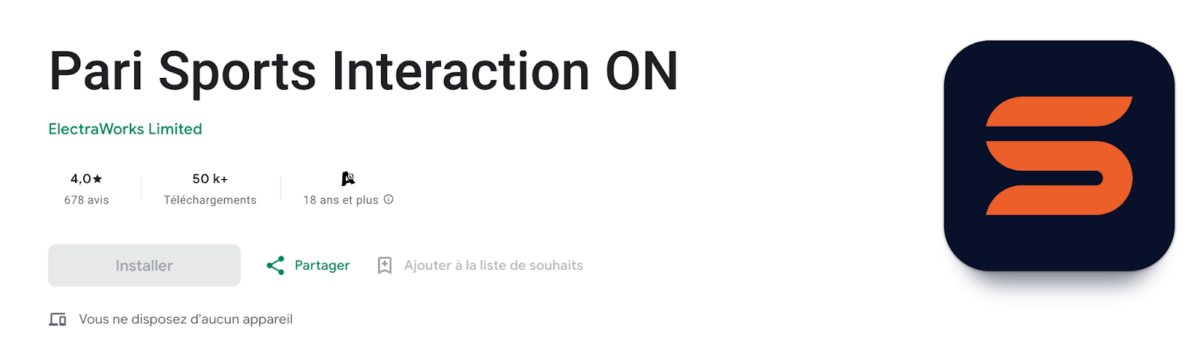
Android users should confirm they are downloading the sportsbook app, not the live-scores listing
Geolocation must be active for bet placement, regardless of account status
Sports Interaction App at a Glance
We have done the research for you on the key specs before you download. Here is the fast snapshot of the Sports Interaction mobile app, based on current App Store and Google Play listings plus our direct testing.
Is the Sports Interaction App Legal in Canada? Province Availability Explained
Yes, the Sports Interaction app is fully legal in Canada. The regulatory setup splits into two streams depending on where you are playing from, and understanding that split avoids a lot of unnecessary confusion.
19+ New players only. Min $10 deposit. Bonus equal to 125% of your 1st deposit up to $750. 6x rollover on deposit + bonus. Canada only (excl Ontario). Play Responsibly. T&Cs apply
Ontario vs the Rest of Canada
Ontario players access Sports Interaction through a dedicated version of the app operated by ElectraWorks Maple Limited under AGCO internet gaming operator licence OPIG1242525, contracted with iGaming Ontario. Players in all other provinces are served under an interactive gaming permit from the Kahnawake Gaming Commission, now held by Entain following the end of the Mohawk Council operating partnership in October 2024. Both versions offer the same core sportsbook features.
Geolocation and Access Rules
Eligibility is based on physical location at the time of play, not just account creation. Location Services must be active on your device. If you are travelling outside Canada, bet placement will be blocked by the geolocation check even if your account is in good standing.
Province
App Available
Minimum Age
Regulatory Body
Ontario
Yes (dedicated Ontario app)
19
iGaming Ontario / AGCO
British Columbia
Yes
19
Kahnawake Gaming Commission
Alberta
Yes
18
Kahnawake Gaming Commission
Quebec
Yes
18
Kahnawake Gaming Commission
Manitoba
Yes
18
Kahnawake Gaming Commission
All other provinces
Yes
19
Kahnawake Gaming Commission
Outside Canada
No: geo-blocked
N/A
N/A
How to Download the Sports Interaction App on iPhone and Android
Downloading the Sports Interaction app is straightforward on both platforms, but there are a few points worth knowing before you start, particularly on Android where a separate live-scores app can appear in search results alongside the sportsbook app.
Downloading on iPhone (iOS)
Open the App Store, confirm your Apple ID region is set to Canada, and search for “Sports Interaction: Bet and Play”. Tap Get, authenticate with Face ID or your Apple ID password, and allow the install. When the app opens for the first time, tap Allow when prompted for Location Services. This is required for bet placement. Ontario players will be directed to the Ontario-specific version automatically based on location.
Downloading on Android
Open the Google Play Store, confirm your Google account region is set to Canada, and search for “Sports Interaction”. Select the sportsbook app from Entain, not the separate scores or news listing that may also appear. Tap Install, open the app, and allow Location permissions when prompted. No sideloading or settings change is required as the app is available directly through the Play Store.
Device
Store
App Name to Search
Common Issue
Fix
iPhone / iPad
App Store
Sports Interaction: Bet and Play
Listing not visible
Check Apple ID region is set to Canada
Android
Google Play
Sports Interaction (by Entain)
Scores app appears instead
Select the correct sportsbook listing
Either
App or browser
N/A
Location error on login
Enable Location Services, disable any active VPN
nce the app is installed, new users can complete the Sports Interaction sign-up process directly from mobile, including account creation, verification, and deposit-limit setup.
Sports Interaction App Requirements and Compatibility
19+ New players only. Min $10 deposit. Bonus equal to 125% of your 1st deposit up to $750. 6x rollover on deposit + bonus. Canada only (excl Ontario). Play Responsibly. T&Cs apply
Before downloading, confirm your device meets the minimum requirements. Most current iPhones and Android handsets qualify without any issue, but older devices running outdated operating systems can cause installation failures that look like app errors but are actually OS version problems.
Requirement
iOS
Android
Minimum OS
iOS 16.0 or later
Android 10.0 (Q) or later
Storage Required
Approx. 113 MB
Approx. 22 MB
Device Types
iPhone and iPad
Phones and tablets
Internet Connection
Required (Wi-Fi or data)
Required (Wi-Fi or data)
Location Services
Required for betting
Required for betting
Account Verification
KYC required before first withdrawal
KYC required before first withdrawal
Biometric Login
Face ID / Touch ID supported
Fingerprint supported
Location Services is the requirement that catches most users off guard. The app uses geolocation to confirm you are physically present in an eligible Canadian province each time you place a bet. Browsing and account management work without it, but staking does not.
Sports Interaction App Bonus: How to Register and Claim Your Offer
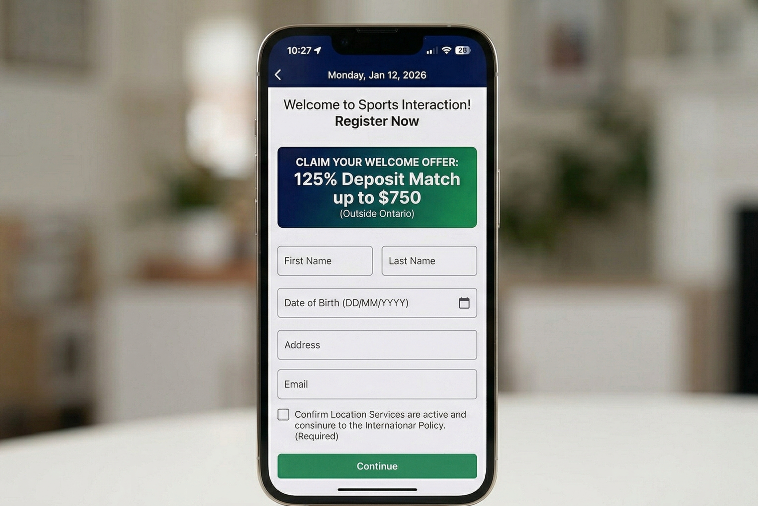
Registering and claiming a welcome offer through the Sports Interaction app follows the same flow as the desktop site. The process is clean and, in our testing, took under five minutes from download to first deposit. Note that welcome bonuses are not available to Ontario residents under provincial advertising regulations.
Step
Action
Common Issue
Tip
1
Open app and tap Register
Button not visible
Update the app to the latest version first
2
Enter personal details: name, DOB, address, email
Address not accepted
Use your full registered address as on ID
3
Set deposit limits when prompted
Skipped by accident
These can be adjusted in account settings later
4
Select or confirm welcome bonus
Offer not showing
Ensure you are not accessing via Ontario region
5
Upload KYC documents: photo ID and proof of address
Documents rejected
Ensure files are clear, unedited, and current
6
Make first deposit and place qualifying bet if required
Deposit declined
Confirm device region and Location Services are on
Outside Ontario, two sportsbook welcome options are available: a 125% deposit match up to $750 (6x rollover at odds of 1.50 or higher, 60-day window) or a No Sweat Bet up to $500 (1x rollover). The casino welcome offer is a 100% match up to $3,000 with a 30x wagering requirement within 14 days. Always check current terms on the SIA site before depositing, as promotional offers update regularly.
Before claiming an app bonus, check whether a Sports Interaction Promo Code is required, as bonus terms can vary by province, offer type, and registration method.
How to Bet on the Sports Interaction App
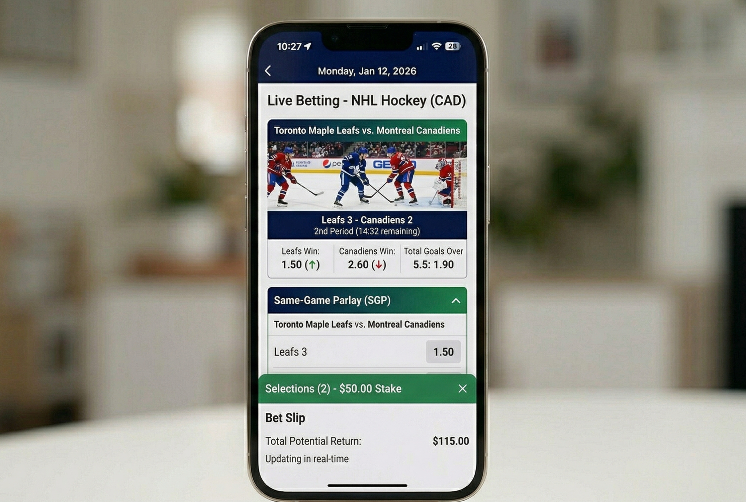
Placing a bet on the Sports Interaction app is designed to be quick. From our testing, browsing a market, building a bet slip, and confirming a wager takes a matter of seconds once you know the layout. Here is how the flow works in practice.
Bet Type
What It Means
Best For
Risk Level
Straight / Moneyline
Single selection on a match outcome
Beginners, value hunters
Lower
Point Spread
Betting a team to win by a margin
NFL, NBA, CFL bettors
Medium
Totals (Over/Under)
Wagering on combined score
Hockey and basketball
Lower to Medium
Parlay
Multiple legs combined for higher return
Experienced bettors
Higher
Same-Game Parlay (SGP)
Multiple markets from one match combined
Single-game focus
Higher
Live Bet
Placed while the game is in progress
Active bettors, in-play specialists
Varies
Props
Player or event specific outcomes
NHL player nights, NBA scorers
Medium to Higher
The practical steps to place any bet on the app:
Tap the sport or league from the home screen or sidebar
Select the event and scroll through available markets
Tap any odds to add the selection to your bet slip
Add additional legs if building a parlay or same-game parlay
Enter your stake amount, check the potential return, and tap Place Bet
For live bets, the same steps apply but move through them quickly. Odds move with game action and your original selection may be refreshed before you confirm.
19+ New players only. Min $10 deposit. Bonus equal to 125% of your 1st deposit up to $750. 6x rollover on deposit + bonus. Canada only (excl Ontario). Play Responsibly. T&Cs apply
Deposits and Withdrawals on the Sports Interaction App
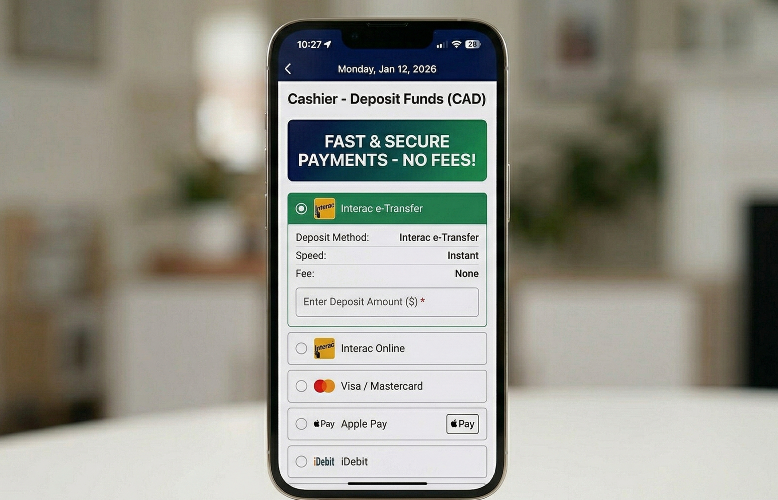
All banking on the Sports Interaction app is conducted in CAD with no fees charged by SIA on most methods. The cashier is accessible directly from the app’s account menu and mirrors the desktop experience closely. In our testing, Interac e-Transfer was the fastest and most reliable route for both deposits and withdrawals.
Method
Deposit Speed
Withdrawal Speed
Fees
Best For
Interac e-Transfer
Instant
Same day to 24 hrs
None
Most Canadian users
Interac Online
Instant
Same day to 24 hrs
None
Quick bank-linked deposits
Visa / Mastercard
Instant
3 to 5 business days
None
Card users
Apple Pay
Instant
Deposit only
None
iPhone users
iDebit / INSTADEBIT
Instant
1 to 3 business days
None
Bank transfer preference
ecoPayz / MuchBetter
Instant
1 to 3 business days
None
E-wallet users
Bank Transfer
1 to 3 days
3 to 5 business days
Check with bank
Large withdrawals
One important note: each account receives one free withdrawal every 30 days. Additional withdrawals within that period may incur a processing fee depending on the method. Complete KYC document verification before your first withdrawal request to avoid holds. Deposits are not subject to the same restriction.
What Features Does the Sports Interaction App Actually Offer?
The analysis we made of the app’s feature set found it closely matches the desktop site with no major capability gaps. The most frequently used features all work smoothly in the mobile environment.
Feature
Available on App
Available on Mobile Web
Why It Matters
Live Betting
Yes
Yes
In-play markets across all major sports
Same-Game Parlay
Yes
Yes
Combine markets from one match into one bet
Cash-Out
Yes
Yes
Exit bets early, full or partial
Live Streaming
Yes
Yes
Watch events directly in the app
Bet Builder
Yes
Yes
Custom multi-market single-game bets
Deposits and Withdrawals
Yes
Yes
Full cashier access from account menu
Casino and Slots
Yes
Yes
Full lobby accessible within the app
Live Casino
Yes
Yes
Blackjack, roulette, baccarat via Evolution
Push Notifications
Yes
No
Odds alerts and settlement updates
Biometric Login
Yes
No
Face ID, Touch ID, fingerprint access
Pinata Picks
Yes
Yes
Randomised boosted odds feature
For a broader breakdown of the platform beyond mobile betting, read our full Sports Interaction analysis, which covers sportsbook depth, casino features, payments, and overall value for Canadian players.
User Experience Review: Navigation, Speed, and Mobile Betting Flow
Our expert team spent time working through the Sports Interaction app the way a regular bettor would, not just clicking through menus. The practical flow from home screen to confirmed bet is where the real quality of a mobile app shows up.
Navigation and Layout
The home screen loads a live odds ticker and quick-access tiles for major sports at the top, with the full sports menu accessible via a sidebar tab. Finding a specific league takes two or three taps at most. The search function works well for both player props and niche sports like table tennis or darts.
Bet Slip Usability
The bet slip sits in a persistent tab at the bottom of the screen, remaining accessible while you browse markets. You can add multiple selections without losing your place in the market list. Stake input is clean, with potential return updating in real time as you type.
19+ New players only. Min $10 deposit. Bonus equal to 125% of your 1st deposit up to $750. 6x rollover on deposit + bonus. Canada only (excl Ontario). Play Responsibly. T&Cs apply
Live Betting Flow
The live betting tab is where the app performs best. Odds refresh quickly without the screen jumping around, and the layout separates in-play events clearly from pre-match markets. We placed multiple live bets across NHL and NBA games without any lag or rejection issues.
Area
Our Verdict
Notes
Home Screen
Good
Fast to load, relevant sports surfaced upfront
Sports Navigation
Good
Two to three taps to any league
Search
Good
Reliable for teams, players, and niche events
Bet Slip
Very Good
Persistent, clean, real-time return display
Live Betting UX
Excellent
Best feature on the app, minimal lag
Banking / Cashier
Good
Full function, minor extra tap vs competitors
iOS Overall
Very Good
Well-rated, fast, consistent
Android Overall
Good
Rated 3.7 on Google Play; some lag on busy event days reported
The one honest gap worth flagging: the Android app has attracted some user reports of performance issues during peak live events, such as major NHL playoff games. The iOS app does not show the same pattern in current reviews. If Android is your platform, having the mobile website as a backup is sensible on the busiest nights.
Sports Interaction App Troubleshooting
The biggest content gap across competitor pages is practical troubleshooting. Most issues with the Sports Interaction app fall into a small set of categories, and most of them have fast fixes that do not require a support call.
Clear app cache, update app and device OS, restart
If freezes occur repeatedly on a current device
Bet slip not accepting stake
Geo check failing or odds changed since selection
Refresh the market, confirm location is on
If this happens across multiple bets
Casino tiles not loading
Regional restriction on casino content
Check province eligibility for casino products
If eligible province but content still missing
App vs Mobile Website: Which Is Better?
Both the app and the Sports Interaction mobile website deliver the full sportsbook experience, so the real question is which one fits your habits better rather than which one is technically superior.
Use Case
App Wins
Mobile Web Wins
Quick bet placement
Yes: faster launch, biometric login
Live betting
Yes: better odds refresh, push alerts
Deep market research
Yes: easier to compare across tabs on browser
Comparing multiple operators
Yes: switch between sites in browser
No storage or install needed
Yes: access immediately via browser
Notifications and alerts
Yes: push notifications on device
Slower device or older phone
Yes: no install overhead
Casino play
Yes: optimised lobby layout on app
The app is the better choice for most Canadian bettors who use Sports Interaction regularly. The mobile website suits users who want zero friction on a new device, or who prefer doing market research across multiple tabs before committing.
19+ New players only. Min $10 deposit. Bonus equal to 125% of your 1st deposit up to $750. 6x rollover on deposit + bonus. Canada only (excl Ontario). Play Responsibly. T&Cs apply
Customer Support and Account Safety
Sports Interaction offers 24/7 support accessible directly from within the app. In our testing, live chat was the fastest and most effective channel, with responses coming well under one minute. Support is available in English and French.
Issue Type
Best Channel
Contact Details
Expected Speed
Login or account access
Live Chat
Via app or site help menu
Under 1 minute
Payment or withdrawal query
Live Chat
Via app or site help menu
Under 1 minute
KYC or verification
Email
support@sportsinteraction.com
Within a few hours
Urgent account issue
Phone
+1-888-922-5575
Direct
General questions
Help Centre
Available in app and on site
Self-serve, instant
On account safety: Sports Interaction uses SSL encryption across all transactions and supports two-factor authentication and biometric login. The platform is regulated under either the iGaming Ontario framework or the Kahnawake Gaming Commission permit, both of which require independent auditing and segregated player funds.
Responsible gambling tools available directly from the app include deposit limits, session time limits, cooling-off periods, and self-exclusion. These can be set during registration or adjusted at any time from your account settings.
Final Verdict: Who Is the Sports Interaction App Best For?
We rate the Sports Interaction app at 4.2 out of 5 for Canadian players. It is a reliable, well-built mobile platform that delivers on the basics and excels at live betting. The iOS experience is particularly strong. Android users get the same features but should be aware of occasional performance reports during peak events.
Download the App If You Are:
An NHL, CFL, NBA, or NFL bettor who wants fast, Canada-focused in-play access
A Canadian player who wants sportsbook, casino, live betting, and banking in one app
Someone who values trusted, long-standing licensing over a newer or flashier alternative
An Interac user who wants same-day or next-day withdrawal from mobile
Consider Alternatives If You:
Are on Android and want guaranteed zero-friction discovery and install
Want live event streaming from a broader range of sports (Bet365 leads here)
Need crypto deposit options
Are an Ontario player and want to confirm current bonus availability before registering
Sports Interaction App FAQs
Is the Sports Interaction app available across Canada?
Yes. The Sports Interaction app is available across Canada, but Ontario uses a separate version. You must be physically in Canada to place bets.
How do I download the Sports Interaction app?
To download the Sports Interaction app, search for it in the Canadian App Store or Google Play. Android users should make sure they choose the sportsbook app, not the scores app.
Can I deposit and withdraw in the Sports Interaction app?
Yes. The Sports Interaction app supports direct deposits and withdrawals. Interac is the fastest option for most Canadian users.
What should I do if the Sports Interaction app is not working?
If the Sports Interaction app is not working, check Location Services, turn off any VPN, and update the app. If that fails, contact support.
Is the Sports Interaction app better than the mobile website?
Usually, yes. The Sports Interaction app is quicker for betting, live markets, and account access, while the mobile site works well as a backup.
I am a lover and fan of sports and iGaming with a passion for writing about what I love. I have over 4 years of writing experience in iGaming, sports betting, casinos, and slots. I have always been enthusiastic about the sports betting space, and in 2020, I began writing content on related topics. I have written for multiple websites since then. The interesting aspect of writing sports betting content is the constant need to research and stay current, as the space is constantly evolving. My writing is engaging and promises to provide you with the exact information you seek.




 Bonus
Bonus 



 nba
nba  soccer
  casino